API · MCP
BuildSaints research in your own tools
Our ranking of U.S.-listed companies by their AI products and their fit with Catholic teaching, what AI may displace in each business, company news, and guides to AI’s areas — over HTTPS and as an MCP server for Claude, ChatGPT, Muse or your own code. The public reads need no key; your own holdings need your key.
BuildSaints is a Catholic AI agent for your daily plan of life: prayer and reading, the sacraments nearby, and your parish’s saints and devotions, woven into your calendar, your time and your money — for young adults in New York, on the App Store, Google Play and the web at buildsaints.com/app. As a registered investment adviser, BuildSaints shares this ranking right in the chat; this API brings the same research to your own tools. About BuildSaints ›
https://buildsaints.com/api/v1https://buildsaints.com/mcphttps://buildsaints.com/claude/marketplace.jsonbuildsaints-openai-plugin-1.0.1.zipOn this page
Getting startedYour API keyA first callAuthenticationTickersReferenceConceptsMCP and pluginsDisclaimersGetting started
Every answer is read from BuildSaints’ stored research, with its date and sources. Nothing is written by a model at the moment you ask. Try the ranking now — no key, no account:
curl https://buildsaints.com/api/v1/rankings?limit=3
The API’s front door, https://buildsaints.com/api/v1/, lists every endpoint with the OpenAPI and the MCP
server’s address.
To read your own holdings and the review of your portfolio, make an API key in the app and connect your Schwab account there.
Your API key
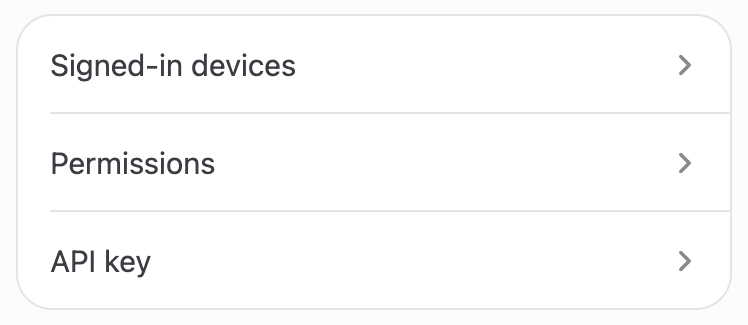
- In the BuildSaints app, open Settings › Profile › API key (from the chat: the ☰ menu, then the ⚙ at its foot).
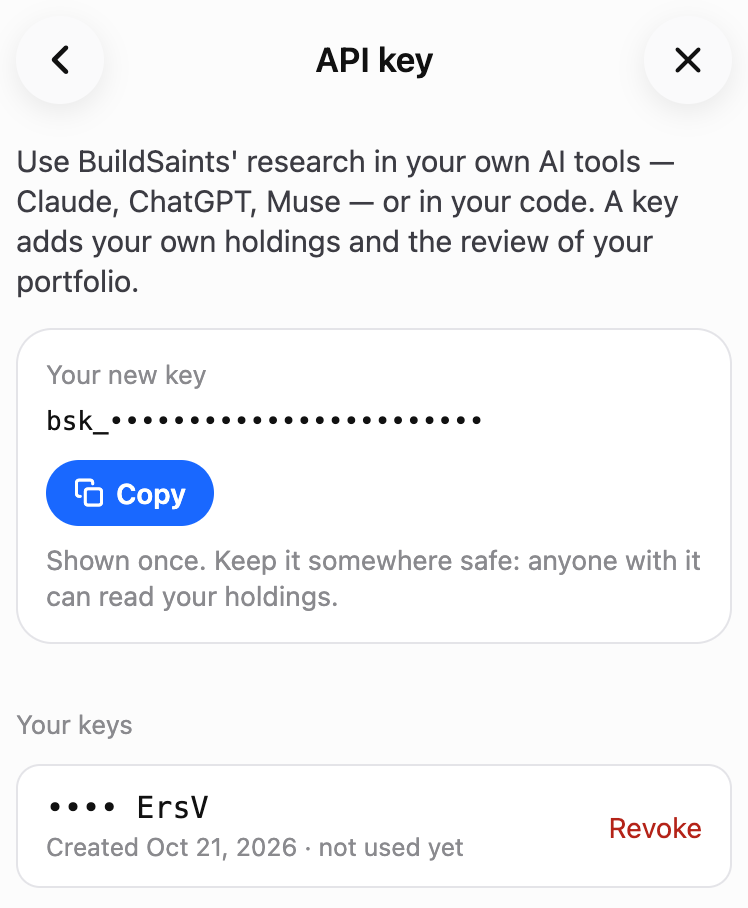
- Tap Create a key, then Copy. The key starts with
bsk_and is shown once: keep it somewhere safe. - Your keys are listed by their last four characters, with the day each was made and last used. Revoke stops a key at once.
A key is made by an account with a phone number (Settings › Profile); you may hold five at once. Anyone with your key can read your holdings, so never put it in a web page others can load, in a shared GPT or in an organization’s connector.
Your holdings: connect Schwab
Your holdings come from your Schwab account, linked in the app under Settings › Connections › Schwab.
Without a linked account, my_holdings says so, and review_portfolio still reviews any companies you pass.
A first call
# the top five, with each company's AI reason and alignment reason
curl "https://buildsaints.com/api/v1/rankings?limit=5"

# one company whole
curl https://buildsaints.com/api/v1/companies/NVDA

# your own holdings, with your key
export BUILDSAINTS_API_KEY=bsk_...
curl -H "Authorization: Bearer $BUILDSAINTS_API_KEY" https://buildsaints.com/api/v1/me/holdings
import os, requests

BASE = "https://buildsaints.com/api/v1"

top = requests.get(f"{BASE}/rankings", params={"limit": 5}, timeout=30).json()
for r in top["rankings"]:
    print(r["rank"], r["ticker"], r["ai_reason"])

key = os.environ["BUILDSAINTS_API_KEY"]
review = requests.get(f"{BASE}/me/review", params={"holdings": "NVDA,META,ACN"},
                      headers={"Authorization": f"Bearer {key}"}, timeout=30).json()
for h in review["review"]["holdings"]:
    print(h["ticker"], h["ai_view"], h["line"])
const BASE = 'https://buildsaints.com/api/v1';
const top = await (await fetch(`${BASE}/rankings?limit=5`)).json();
top.rankings.forEach((r) => console.log(r.rank, r.ticker, r.ai_reason));
const mine = await fetch(`${BASE}/me/holdings`, {
headers: { Authorization: `Bearer ${process.env.BUILDSAINTS_API_KEY}` },
});
console.log(await mine.json());Authentication and limits
The public reads need no key. my_holdings and review_portfolio need yours, sent as
Authorization: Bearer bsk_… or X-API-Key: bsk_…. A key reads only its own
member’s account.
| Caller | Per minute | Per day |
|---|---|---|
| No key, per address | 60 | 3,000 |
| With a key, per key | 120 | 10,000 |
Past a limit the answer is 429 with Retry-After in seconds. Every error has one shape:
{"error": {"code": "unknown_ticker", "message": "ZZZZ is not one of the companies BuildSaints ranks …"}}| Status | Code | When |
|---|---|---|
| 400 | bad_inputtoo_many_holdings | A parameter out of range; more than 60 holdings |
| 401 | key_requiredkey_revoked | A member’s read without a key; a key that was revoked |
| 404 | unknown_tickerunknown_guide | A company we do not rank; a guide that does not exist |
| 429 | rate_limited | Past a limit |
| 503 | unavailable | A read that could not be made just now — try again |
What we keep of each call: the tool, its inputs, the time, the status and how long it took; for a call with a key, which key; for one without, a coded reference in place of the address. Never the answers. Deleting your BuildSaints account deletes your keys and their log.
Tickers and names
- We rank U.S.-listed companies of about $1 billion or more; each ranking row says how many (
of). - Pass a ticker in any case, with or without
$:NVDA,nvda,$NVDA. A class share keeps its dot:BRK.B. - One company counts once:
GOOGreads asGOOGL,FOXasFOXA,NWSasNWSA. - A sector is a GICS sector name exactly as the rankings give it, such as
Information Technology. - An AI area is a key such as
customer_supportorchips;GET /ai-areaslists every key.
Reference
Each tool is a REST path under https://buildsaints.com/api/v1 and an MCP tool of the same name. Every
answer also carries schema_version and notice.
/rankings
The ranking, best first, each company with its AI reason and its alignment reason.
| Input | Type | Notes |
|---|---|---|
limit | integer | 1–100, default 25 |
offset | integer | default 0 |
sector | string | optional; a sector name |
GET /api/v1/rankings?limit=1
{"as_of": "2026-10-18", "total": 1632, "offset": 0, "limit": 1, "sector": null,
 "rankings": [{"rank": 1, "of": 1632, "ticker": "NVDA", "name": "NVIDIA",
   "sector": "Information Technology", "score": 94.6, "sector_rank": 1, "previous_rank": 1,
   "ai_reason": "NVIDIA's data center compute leads its category. …",
   "alignment_reason": "Neutral to good. It contributes open models and runs research computing, …",
   "as_of": "2026-10-18"}],
"method": "Each company is graded on its whole business, …"}/companies/{ticker}
One company whole: its place and reasons in the ranking, its AI products, what AI may take from its business, how it treats its people, its fit with Catholic teaching with the teaching quoted exactly, and sources with dates.
| Field | What it holds |
|---|---|
ranking | rank, score, sector rank, previous rank, the two reasons |
products · strongest · weakest | its AI products, each with what it does and a score out of 100 with the reason |
leading · building | where its products lead and where its business gains from AI, with shares of revenue |
taking | the parts of its business AI may take, with the risk and the share of revenue |
people | how it treats its people as it gains from AI |
catholic_fit · teaching | a good that lifts it or a harm that weighs on it; the teaching’s exact text and cite |
readings · sources | each reading with its sources; each source’s title, date and link |
areas | its AI areas and their shares of the business |
GET /api/v1/companies/NVDA  (a few fields)
{"ticker": "NVDA", "name": "NVIDIA", "sector": "Information Technology",
 "ranking": {"rank": 1, "of": 1632, "score": 94.6, "ai_reason": "…", "alignment_reason": "…"},
 "people": {"value": "its people kept and retrained as it gains from AI", "reason": "…"},
 "catholic_fit": {"kind": "good", "words": "a good that lifts it", "share": "a small part"},
 "teaching": [{"cite": "Magnifica Humanitas 113", "text": "In reality, elevating any single dimension …"}],
 "areas": [{"area": "chips", "share": 45.0}, {"area": "compute_datacenter", "share": 30.0}],
"as_of": "2026-10-18"}/companies/{ticker}/news
The dated news articles we read on one company, newest first.
| Input | Type | Notes |
|---|---|---|
limit | integer | 1–20, default 10 |
days | integer | 1–90, default 30 |
{"ticker": "NVDA", "days": 30,
"news": [{"day": "2026-10-02", "headline": "…", "source": "The Edge Singapore", "url": "https://…"}]}/ai-areas · /ai-areas/{area}
Without an area: the areas with the most opportunity, the companies most displaced across the market, and every area key. With one: how far the AI labs reach it (risk and opportunity, with why), the companies leading there, the companies AI may displace, the area’s kind and its guide.
GET /api/v1/ai-areas/customer_support  (a few fields)
{"area": "Customer support", "area_key": "customer_support", "kind": "work area",
 "labs": {"risk": "high", "risk_why": "…", "opportunity": "large", "opportunity_why": "…"},
 "leaders": [{"ticker": "…", "name": "…", "place": "#… of 1632", "share": "… of its business", "line": "…"}],
 "at_risk": [{"ticker": "CNXC", "name": "Concentrix", "part": "The whole company", "risk": "High risk"}],
 "guide": {"id": "customer_support", "title": "How AI answers customer calls",
"url": "https://buildsaints.com/api/v1/guides/customer_support"}}/guides
Every published guide to an area of AI: its id, title, summary and kind — a work area (what AI does at work), infrastructure (chips, compute, networking, models, memory, power) or an industry.
{"guides": [{"id": "ui_design", "area": "ui_design", "title": "How AI designs a screen",
"summary": "AI can now draft a screen's layout from a description …", "kind": "work area"}, …]}/guides/{area}
One guide whole: its steps, its glossary, the free tools and upgrades it names (each with its maker, cost, the account it needs and its sources), the lines it keeps for working as a Catholic, the exact teaching with its reference, what to learn next, the leading and displaced companies, and the day it was checked.
{"id": "customer_support", "title": "How AI answers customer calls", "checked": "…",
 "steps": [{"step": "…", "line": "…", "tool_ref": ["…"]}],
 "glossary": [{"term": "…", "line": "…"}],
 "tools": [{"name": "…", "maker": "…", "tier": "free", "cost": "…", "signup_url": "https://…", "sources": ["https://…"]}],
 "teaching": {"ref": "Magnifica Humanitas 156", "quote": "One viable path is, first of all, …"},
"leaders": […], "at_risk": […]}/me/holdings
Your keyYour holdings from your Schwab account linked in the app, each with its place in the ranking.
{"connected": true,
 "holdings": [{"ticker": "NVDA", "name": "NVIDIA", "value": 1250.0, "weight": 0.5, "rank": 1, "of": 1632}, …],
"note": "Values are your Schwab account's own, at its last read in the app."}/me/review
Your keyA review of your linked portfolio, or of the companies you pass: its mix of AI leaders and companies AI may displace, its sectors and AI areas, its concentration, and each holding’s case with the teaching that bears on it.
| Input | Type | Notes |
|---|---|---|
holdings | list | optional; up to 60, each TICKER or TICKER:dollars. A query string takes them comma-separated; a POST takes {"holdings": […]}. Without it, your linked account. |
GET /api/v1/me/review?holdings=NVDA,ACN  (a few fields)
{"review": {"holdings": [{"ticker": "NVDA", "ai_view": "leader", "displacement": "0 of 100", "line": "…"},
                         {"ticker": "ACN", "ai_view": "at_risk", "line": "Medium risk from AI to Americas Segment …"}],
            "portfolio": {"ai_view_mix": {"leader": "50%", "at_risk": "50%"}, "sectors": […],
                          "concentration": {"largest": "50%", …}},
            "as_of": "2026-10-18"}}
Concepts
The ranking
Each company is graded on its whole business, with its AI products and the ways AI is changing that business at the center, judged through Catholic teaching. Each place carries two reasons: the AI reason (what its AI products do and how far they reach) and the alignment reason (how its products and conduct fit Catholic teaching). A near-term view of the stock is part of the order and is never published.
AI products
Each product is read for how central it is to the company, its traction (launched, adopting, scaling), how large it could become, and whether it runs on the company’s own model.
Displacement
What AI may take from a business: the parts the AI labs’ own products now reach, each with its share of revenue, and a score out of 100 for the whole company.
Catholic fit and the teaching
A good that lifts a company or a harm that weighs on it, sized by how much of the business it is. The teaching behind it is quoted exactly, with its citation — the Church’s documents, among them Magnifica Humanitas.
Areas and guides
AI’s areas come in three kinds: work areas (what AI does at work), the infrastructure under it, and the industries it changes. Each published area has a guide with its steps, tools, glossary and teaching.
Dates and sources
Every answer gives its as_of date; readings and guides carry their sources by title and date. The ranking is
updated each day.
Portfolios
Members build and run Long only and Long/short portfolios in the BuildSaints app, on their own accounts and only on their own tap. The API has no portfolio endpoint.
MCP and plugins
The MCP server is https://buildsaints.com/mcp over Streamable HTTP (protocol versions 2025-11-25,
2025-06-18, 2025-03-26 and 2024-11-05). Its tools are rankings, company,
company_news, ai_area, guides and guide; with your key also
my_holdings and review_portfolio. Every tool only reads.
Claude Code · the plugin
claude plugin marketplace add https://buildsaints.com/claude/marketplace.json
claude plugin install buildsaints@buildsaints
For your own holdings, set your key before you start Claude Code: export BUILDSAINTS_API_KEY=bsk_….
Without the plugin:
claude mcp add --transport http buildsaints https://buildsaints.com/mcp \
  --header "Authorization: Bearer $BUILDSAINTS_API_KEY"
Check: /mcp lists buildsaints as connected. Ask: “Using BuildSaints,
which companies lead in customer support AI, and which may AI displace?”
Claude · claude.ai and Claude Desktop
- Customize › Connectors, then + Add › Add custom connector.
- Name: BuildSaints. Server URL:
https://buildsaints.com/mcp. Continue. - Authentication: No sign in. For your own holdings on a personal plan, under Request headers add
Authorizationwith the valueBearer bsk_…. - Add. In a chat, open + (lower left) › Connectors and turn on BuildSaints.
Ask: “Using BuildSaints, how do Meta’s products fit Catholic teaching?”
On a Team or Enterprise plan an owner adds it under Organization settings › Connectors › Add › Custom › Web. A header there is shared by everyone who uses the connector, so never put a personal key in it.
ChatGPT · a plugin from our MCP server
- Go to chatgpt.com/plugins, select the + button, then Add custom MCP server.
- Name: BuildSaints. Server URL:
https://buildsaints.com/mcp. Authentication: No authentication. - Select I understand and want to continue, then Create as a plugin.
- In your personal plugins, open BuildSaints and select + to install it.
- On the ChatGPT home page switch from Chat to Work, start a chat, type @ and pick BuildSaints.
Ask: “Using BuildSaints, which areas have the biggest AI opportunity, and who leads them?”
ChatGPT cannot send an API key to an MCP server, so your own holdings are not available in this plugin; use a GPT Action or Claude for those.
Codex and the ChatGPT desktop app · the plugin package
The same server and one skill, in OpenAI’s own plugin format: download
buildsaints-openai-plugin-1.0.1.zip, unzip it, and install the
buildsaints folder as a local plugin, following OpenAI’s
Install a local plugin manually. It reads the public research.
Ask: “Using BuildSaints, which companies lead in AI chips?”
ChatGPT · a GPT Action
- In ChatGPT open GPTs › Create, then the Configure tab › Create new action.
- Import from URL:
https://buildsaints.com/api/v1/openapi.json. - Authentication: None. For your own holdings in a GPT only you use: API Key, Auth Type Bearer, and paste your key.
- Privacy policy:
https://buildsaints.com/legal/privacy-policy/. Save, and ask in the preview.
Ask: “Why is Alphabet ranked where it is?” — or, with your key, “Review my portfolio.”
A GPT carries the key you saved for everyone who uses it: keep a GPT with your key to yourself.
Muse · a custom connector
Muse has no MCP menu: it builds a custom connector when you ask it to in a chat.
- In a Muse chat, ask it to create a custom connector to the BuildSaints MCP server at
https://buildsaints.com/mcp— a remote MCP server over streamable HTTP whose public tools need no authentication — to test its tools, and to save it as a reusable skill. - For your own holdings: when Muse asks for a key, give your BuildSaints key through its Secure Credentials Store prompt,
never in the chat, to be sent as
Authorization: Bearer.
Ask: “Using BuildSaints, which customer support companies are most at risk from AI?”
Meta does not review custom connectors.
Any other MCP client
Server URL https://buildsaints.com/mcp, transport Streamable HTTP, and for your own tools the header
Authorization: Bearer bsk_…. Answers come as JSON; the server keeps no session between calls.
Limits and disclaimers
- The API gives research on companies and their products. Nothing in it is a recommendation to buy or sell a security.
- Each answer is as of the date it gives; a company’s place can change from one day to the next.
- A missing part of an answer is missing in our research; it is never filled in.
- Use is under our Terms and Privacy Policy. Questions: contact us.